
Najlepsza pozycja teraz
#11
w 8 sklepach
Szczyt
#5Dni śledzone
47Oceny
1 Historia wykresu
47 dni zarejestrowanych przez nas
Sklepy
wykres w 8 dzisiaj
Oceny
1 w App Store
Cena
zmieniono 23 raz(y) w naszym oknie
Instalacje i przychody
Apple nie publikuje żadnych — nie zgadujemy
Obecnie na wykresie
Historia
Zbudowane na podstawie codziennych zrzutów Astriny — jeden punkt dziennie.
Pozycja na wykresie — 🇫🇷 Najlepsze płatne
25.08 12.09 24.09
Pokaż liczby
| Dzień | Pozycja |
|---|---|
| 25.08 | #33 |
| 27.08 | #8 |
| 28.08 | #35 |
| 29.08 | #55 |
| 30.08 | #19 |
| 31.08 | #19 |
| 01.09 | #47 |
| 11.09 | #16 |
| 12.09 | #40 |
| 15.09 | #10 |
| 16.09 | #47 |
| 17.09 | #20 |
| 18.09 | #17 |
| 19.09 | #35 |
| 21.09 | #20 |
| 22.09 | #16 |
| 23.09 | #17 |
| 24.09 | #11 |
Liczba ocen
24.07 14.08 30.08
Pokaż liczby
| Dzień | Oceny |
|---|---|
| 24.07 | 1 |
| 02.08 | 0 |
| 03.08 | 1 |
| 04.08 | 0 |
| 05.08 | 1 |
| 06.08 | 0 |
| 07.08 | 0 |
| 08.08 | 0 |
| 09.08 | 0 |
| 12.08 | 1 |
| 13.08 | 0 |
| 14.08 | 1 |
| 15.08 | 1 |
| 17.08 | 1 |
| 20.08 | 2 |
| 22.08 | 2 |
| 23.08 | 2 |
| 24.08 | 2 |
| 25.08 | 1 |
| 26.08 | 0 |
| 27.08 | 1 |
| 28.08 | 1 |
| 29.08 | 1 |
| 30.08 | 1 |
Zrzuty ekranu


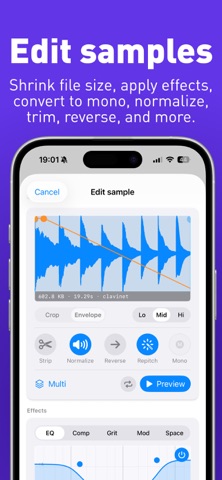


O tej aplikacji
Best Friend is the unrivaled companion app for Teenage Engineering EP-Series Samplers. Connect your EP-133, EP-40, or EP-1320 via USB-C to manage your hardware, upload and edit new files, and see your pad settings.
Best Friend is an extended display and feature augmentation app for the physical EP-133, EP-40, or EP-1320. Connecting to one of these is REQUIRED for the app to function. Use a USB-C to USB-C cable. Lightning iPhones and iPads can connect with USB-IF certified USB-A to USB-C cable and a MFi-certified Lightning to USB adapter.
Scenes:
- See all notes across all banks in a Scene or Song
- See Fader FX and automation lanes for each bank
- Export REAL audio stems of every individual pad from your EP
- Navigate through the Scene timeline with automatic playhead following
Bounce and Export Audio Stems:
- Export REAL audio stems from the hardware WITHOUT AI separation for any Scene or Song
- Choose from every individual pads (all 48), group mixdowns, or stereo mixdowns
- Fader automation is included in the export
- Export MIDI data from a Scene or Song
- Bring your bounces into your DAW of choice for mixing
MIDI Controller:
- Build rich chords with a button. Pick major, minor, suspended, or diminished triads then add a 6th, 7th, or 9th for flavour
- Play the velocity-sensitive keyboard
- Arpeggiator with 4 modes, 6 rates, and 3 octaves synced to the hardware clock
- Configure your own custom chords to any of the Chord or Extension buttons
- Split each key into 1-3 zones for playing chords in alternate positions
- Add pitch bends or modulation to any chord
Sample Editing:
- Extract stems (drum, bass, vocal, guitar, and other instrument) from your samples
- Build and edit multi-samples on the EP-1320 or EP-40
- Use Repitch to reduce the file size
- Permanent cropping
- Increase volume with normalize
- Reverse playback
- Convert stereo to mono
- Change sample rate
- Apply effects: 3-band EQ; compression; distortion and saturation; octaver; phaser; chorus; tremolo; delay; and reverb
- Automatically detect and set the key
- Save default pad settings
Hardware Management:
- Build Kits and Bank Snapshots while disconnected from the hardware
- Bulk upload samples from your Files and Videos
- Bulk move, share, and delete samples
- Edit and replace samples in place
- Import and record MIDI files
- Backup your Project or entire System
- Import Project and System from the official EP Sample Tool
- Extract Projects from your System Backups
- Preview stereo mixes of your Project Backups
- Automatic iCloud syncing across your Apple devices
Pads:
- Mute and unmute individual pads
- Apply performance effects to individual pads: mute, pitch up, pitch down, reverse
- Drag and drop pads to reassign them across groups
- See an entire bank of samples at once
- See the sample waveform along with its name and length
- See and edit the trim, attack, and release windows
- See and adjust volume, pitch, pan, mute, play mode, time-stretch, and MIDI channel
- See Supertone settings on your EP-40
Universal support:
- works on iPhone, iPad, and MacOS with built-in iCloud syncing
- works with EP-133 K.O. II, EP-40 Riddim, and EP-1320 Medieval with dedicated themes for each device
Best Friend is not affiliated with Teenage Engineering in any way.
Best Friend is an extended display and feature augmentation app for the physical EP-133, EP-40, or EP-1320. Connecting to one of these is REQUIRED for the app to function. Use a USB-C to USB-C cable. Lightning iPhones and iPads can connect with USB-IF certified USB-A to USB-C cable and a MFi-certified Lightning to USB adapter.
Scenes:
- See all notes across all banks in a Scene or Song
- See Fader FX and automation lanes for each bank
- Export REAL audio stems of every individual pad from your EP
- Navigate through the Scene timeline with automatic playhead following
Bounce and Export Audio Stems:
- Export REAL audio stems from the hardware WITHOUT AI separation for any Scene or Song
- Choose from every individual pads (all 48), group mixdowns, or stereo mixdowns
- Fader automation is included in the export
- Export MIDI data from a Scene or Song
- Bring your bounces into your DAW of choice for mixing
MIDI Controller:
- Build rich chords with a button. Pick major, minor, suspended, or diminished triads then add a 6th, 7th, or 9th for flavour
- Play the velocity-sensitive keyboard
- Arpeggiator with 4 modes, 6 rates, and 3 octaves synced to the hardware clock
- Configure your own custom chords to any of the Chord or Extension buttons
- Split each key into 1-3 zones for playing chords in alternate positions
- Add pitch bends or modulation to any chord
Sample Editing:
- Extract stems (drum, bass, vocal, guitar, and other instrument) from your samples
- Build and edit multi-samples on the EP-1320 or EP-40
- Use Repitch to reduce the file size
- Permanent cropping
- Increase volume with normalize
- Reverse playback
- Convert stereo to mono
- Change sample rate
- Apply effects: 3-band EQ; compression; distortion and saturation; octaver; phaser; chorus; tremolo; delay; and reverb
- Automatically detect and set the key
- Save default pad settings
Hardware Management:
- Build Kits and Bank Snapshots while disconnected from the hardware
- Bulk upload samples from your Files and Videos
- Bulk move, share, and delete samples
- Edit and replace samples in place
- Import and record MIDI files
- Backup your Project or entire System
- Import Project and System from the official EP Sample Tool
- Extract Projects from your System Backups
- Preview stereo mixes of your Project Backups
- Automatic iCloud syncing across your Apple devices
Pads:
- Mute and unmute individual pads
- Apply performance effects to individual pads: mute, pitch up, pitch down, reverse
- Drag and drop pads to reassign them across groups
- See an entire bank of samples at once
- See the sample waveform along with its name and length
- See and edit the trim, attack, and release windows
- See and adjust volume, pitch, pan, mute, play mode, time-stretch, and MIDI channel
- See Supertone settings on your EP-40
Universal support:
- works on iPhone, iPad, and MacOS with built-in iCloud syncing
- works with EP-133 K.O. II, EP-40 Riddim, and EP-1320 Medieval with dedicated themes for each device
Best Friend is not affiliated with Teenage Engineering in any way.
Szczegóły
| Deweloper | Brian Holt |
|---|---|
| Kategoria | Muzyka |
| Cena | 9,99 € |
| Ocena wiekowa | 4+ |
| Wersja | 3.1 |
| Rozmiar | 284 MB |
| Minimalny iOS | 26.0 |
| ID pakietu | bholtbholt.Studio-133 |
| Wydano | 2026-07-03 |
| Ostatnia aktualizacja | 2026-09-22 |
| Języki | 1 języki |
Na co odpowiada ta strona
- Best Friend for K.O. II recenzje aplikacji
- Best Friend for K.O. II ocena aplikacji
- Best Friend for K.O. II pobranie
- Best Friend for K.O. II pozycja w sklepie z aplikacjami
- recenzje Best Friend for K.O. II
- recenzje i oceny Best Friend for K.O. II
- czy Best Friend for K.O. II jest legalny
- czy Best Friend for K.O. II to oszustwo
- prawdziwe recenzje użytkowników Best Friend for K.O. II
- ocena Best Friend for K.O. II
- skargi na Best Friend for K.O. II
- co ludzie mówią o Best Friend for K.O. II
- recenzje Best Friend for K.O. II aplikacja
- zalety i wady Best Friend for K.O. II
- doświadczenie Best Friend for K.O. II
- czy powinienem zaufać Best Friend for K.O. II
- opinie o Best Friend for K.O. II
- recenzja Best Friend for K.O. II 2026
- sprawdzenie Best Friend for K.O. II
- sprawdzenie bezpieczeństwa Best Friend for K.O. II
