
Najlepsza pozycja teraz
#26
w 1 sklepach
Szczyt
#9Dni śledzone
43Oceny
170 Historia wykresu
43 dni zarejestrowanych przez nas
Sklepy
wykres w 1 dzisiaj
Oceny
170 w App Store
Cena
zmieniono 23 raz(y) w naszym oknie
Instalacje i przychody
Apple nie publikuje żadnych — nie zgadujemy
Obecnie na wykresie
Historia
Zbudowane na podstawie codziennych zrzutów Astriny — jeden punkt dziennie.
Pozycja na wykresie — 🇬🇧 Najlepsze płatne
23.07 26.08 24.09
Pokaż liczby
| Dzień | Pozycja |
|---|---|
| 23.07 | #39 |
| 24.07 | #16 |
| 02.08 | #30 |
| 03.08 | #16 |
| 04.08 | #25 |
| 05.08 | #17 |
| 08.08 | #29 |
| 09.08 | #18 |
| 10.08 | #19 |
| 14.08 | #22 |
| 15.08 | #30 |
| 16.08 | #14 |
| 17.08 | #25 |
| 18.08 | #28 |
| 19.08 | #15 |
| 20.08 | #9 |
| 21.08 | #41 |
| 22.08 | #33 |
| 23.08 | #39 |
| 24.08 | #31 |
| 25.08 | #32 |
| 26.08 | #34 |
| 28.08 | #25 |
| 30.08 | #18 |
| 01.09 | #21 |
| 03.09 | #47 |
| 04.09 | #10 |
| 05.09 | #12 |
| 06.09 | #16 |
| 07.09 | #30 |
| 08.09 | #21 |
| 09.09 | #14 |
| 10.09 | #26 |
| 13.09 | #14 |
| 14.09 | #18 |
| 17.09 | #40 |
| 18.09 | #29 |
| 19.09 | #33 |
| 20.09 | #36 |
| 21.09 | #21 |
| 22.09 | #25 |
| 23.09 | #17 |
| 24.09 | #26 |
Liczba ocen
23.07 16.08 30.08
Pokaż liczby
| Dzień | Oceny |
|---|---|
| 23.07 | 170 |
| 24.07 | 170 |
| 02.08 | 170 |
| 03.08 | 170 |
| 04.08 | 170 |
| 05.08 | 170 |
| 08.08 | 169 |
| 09.08 | 170 |
| 10.08 | 170 |
| 14.08 | 170 |
| 15.08 | 170 |
| 16.08 | 170 |
| 17.08 | 170 |
| 18.08 | 170 |
| 19.08 | 170 |
| 20.08 | 170 |
| 21.08 | 170 |
| 22.08 | 170 |
| 23.08 | 170 |
| 24.08 | 170 |
| 25.08 | 170 |
| 26.08 | 170 |
| 28.08 | 170 |
| 30.08 | 170 |
Zrzuty ekranu
O tej aplikacji
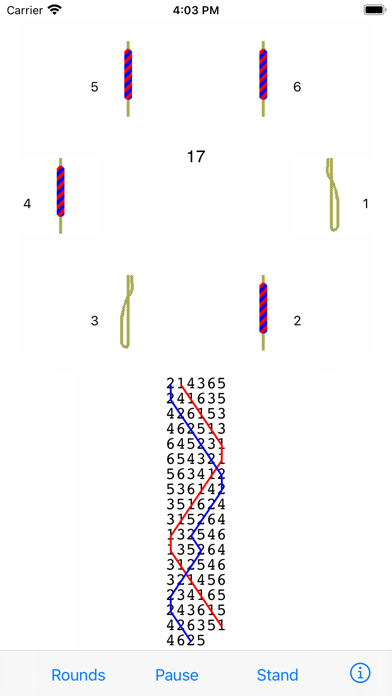
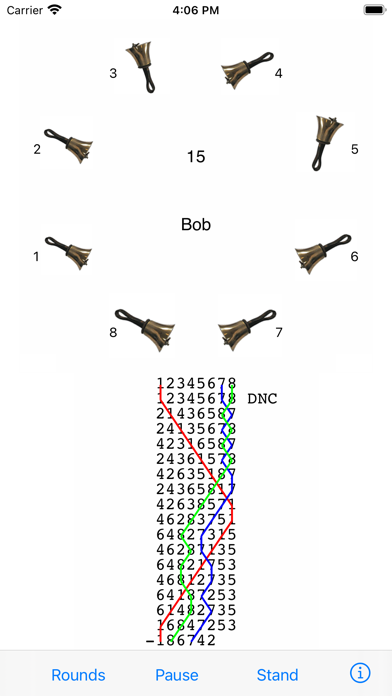
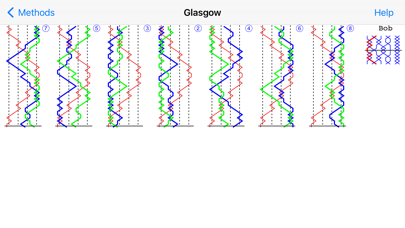
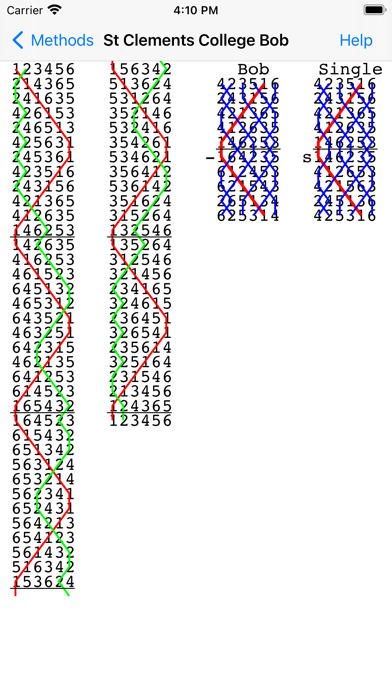
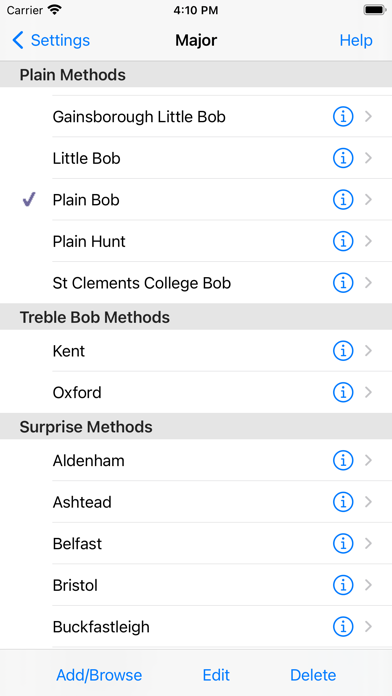
Mobel is a bell ringing simulator for church bell ringers and handbell change ringers. It runs on iPhone, iPad and Apple Mac. When ringers are at home, travelling or at towers, Mobel lets them practise any method they are going to ring. It also shows the blue line diagram for any method, including bobs and singles.
Practise any method on 4 to 16 bells.
Ring plain courses, or touches that Mobel creates (including spliced). Add your own touches (compositions).
Ring any bell; handbell ringers can ring any pair.
Mobel rings the other bells, and speaks any calls.
Conduct: put in bobs and/or singles yourself.
See the blue line diagram for any method or composition that you have added.
Line styles with or without the underlying bell numbers, or as a grid.
Lines for bobs and singles.
Pinch to zoom the diagram.
Select from 20,000 methods in the Central Council library.
Change the speed of the ringing.
Ring with or without a handstroke gap.
Have Mobel wait if you hesitate - or continue in perfect rhythm.
Edit methods and calls to create new methods or doubles variations.
Basic instructions for using Mobel on iPhone and iPad:
- Tap a bell to select it for ringing.
- Tap Start to start the bells ringing rounds.
- Then tap Go to ring the current composition and method.
- Tap the bottom of the screen to ring the bell you selected.
- For handbells, tap right and left to ring a pair.
- Conducting: tap the top of the screen for a bob or single.
- Tap Show to see the blue line for the current method.
- Then double tap to change line style, or pinch to zoom.
- Tap the info (i) button to view and change settings.
- Tap the Help buttons for further information.
From iOS 13.4 onward you can also ring using a keyboard on iPad/iPhone.
Mobel comes from AbelSim, producer of the world's best-selling change ringing simulators: Abel for Windows PCs and Mabel for Apple Mac (see www.abelsim.co.uk).
Mobel is not intended for handbell tune ringers: it rings changes, not tunes.
The latest version runs on iOS 12 and later. Earlier versions of Mobel are still available for previous versions of iOS.
Practise any method on 4 to 16 bells.
Ring plain courses, or touches that Mobel creates (including spliced). Add your own touches (compositions).
Ring any bell; handbell ringers can ring any pair.
Mobel rings the other bells, and speaks any calls.
Conduct: put in bobs and/or singles yourself.
See the blue line diagram for any method or composition that you have added.
Line styles with or without the underlying bell numbers, or as a grid.
Lines for bobs and singles.
Pinch to zoom the diagram.
Select from 20,000 methods in the Central Council library.
Change the speed of the ringing.
Ring with or without a handstroke gap.
Have Mobel wait if you hesitate - or continue in perfect rhythm.
Edit methods and calls to create new methods or doubles variations.
Basic instructions for using Mobel on iPhone and iPad:
- Tap a bell to select it for ringing.
- Tap Start to start the bells ringing rounds.
- Then tap Go to ring the current composition and method.
- Tap the bottom of the screen to ring the bell you selected.
- For handbells, tap right and left to ring a pair.
- Conducting: tap the top of the screen for a bob or single.
- Tap Show to see the blue line for the current method.
- Then double tap to change line style, or pinch to zoom.
- Tap the info (i) button to view and change settings.
- Tap the Help buttons for further information.
From iOS 13.4 onward you can also ring using a keyboard on iPad/iPhone.
Mobel comes from AbelSim, producer of the world's best-selling change ringing simulators: Abel for Windows PCs and Mabel for Apple Mac (see www.abelsim.co.uk).
Mobel is not intended for handbell tune ringers: it rings changes, not tunes.
The latest version runs on iOS 12 and later. Earlier versions of Mobel are still available for previous versions of iOS.
Szczegóły
| Deweloper | AbelSim |
|---|---|
| Kategoria | Muzyka |
| Cena | £5.99 |
| Ocena wiekowa | 4+ |
| Wersja | 2.4.4 |
| Rozmiar | 9.8 MB |
| Minimalny iOS | 12.0 |
| ID pakietu | com.abelsim.Mobel |
| Wydano | 2010-10-26 |
| Ostatnia aktualizacja | 2024-12-01 |
| Języki | 1 języki |
Na co odpowiada ta strona
- Mobel bell ringing simulator recenzje aplikacji
- Mobel bell ringing simulator ocena aplikacji
- Mobel bell ringing simulator pobranie
- Mobel bell ringing simulator pozycja w sklepie z aplikacjami
- recenzje Mobel bell ringing simulator
- recenzje i oceny Mobel bell ringing simulator
- czy Mobel bell ringing simulator jest legalny
- czy Mobel bell ringing simulator to oszustwo
- prawdziwe recenzje użytkowników Mobel bell ringing simulator
- ocena Mobel bell ringing simulator
- skargi na Mobel bell ringing simulator
- co ludzie mówią o Mobel bell ringing simulator
- recenzje Mobel bell ringing simulator aplikacja
- zalety i wady Mobel bell ringing simulator
- doświadczenie Mobel bell ringing simulator
- czy powinienem zaufać Mobel bell ringing simulator
- opinie o Mobel bell ringing simulator
- recenzja Mobel bell ringing simulator 2026
- sprawdzenie Mobel bell ringing simulator
- sprawdzenie bezpieczeństwa Mobel bell ringing simulator
