
GPS Map Camera : Geo Timestamp
SUSAMP INFOTECH Zdjęcia i wideo 4+ Darmowy
4.55 · 171,757 ocen
Najlepsza pozycja teraz
#58
w 1 sklepach
Szczyt
#40Dni śledzone
49Oceny
171,757 Historia wykresu
49 dni zarejestrowanych przez nas
Sklepy
wykres w 1 dzisiaj
Oceny
171,757 w App Store
Cena
zmieniono 28 raz(y) w naszym oknie
Instalacje i przychody
Apple nie publikuje żadnych — nie zgadujemy
Obecnie na wykresie
Historia
Zbudowane na podstawie codziennych zrzutów Astriny — jeden punkt dziennie.
Pozycja na wykresie — 🇮🇳 Najlepsze darmowe
23.07 26.08 24.09
Pokaż liczby
| Dzień | Pozycja |
|---|---|
| 23.07 | #40 |
| 24.07 | #70 |
| 25.07 | #75 |
| 31.07 | #77 |
| 01.08 | #78 |
| 02.08 | #89 |
| 04.08 | #89 |
| 05.08 | #77 |
| 06.08 | #73 |
| 07.08 | #73 |
| 08.08 | #75 |
| 09.08 | #94 |
| 11.08 | #84 |
| 12.08 | #75 |
| 13.08 | #70 |
| 14.08 | #71 |
| 15.08 | #68 |
| 18.08 | #86 |
| 19.08 | #66 |
| 20.08 | #60 |
| 21.08 | #63 |
| 22.08 | #63 |
| 23.08 | #93 |
| 25.08 | #86 |
| 26.08 | #71 |
| 27.08 | #91 |
| 28.08 | #79 |
| 29.08 | #100 |
| 30.08 | #96 |
| 01.09 | #85 |
| 02.09 | #71 |
| 03.09 | #70 |
| 04.09 | #68 |
| 05.09 | #96 |
| 06.09 | #98 |
| 08.09 | #76 |
| 09.09 | #64 |
| 10.09 | #59 |
| 11.09 | #64 |
| 12.09 | #77 |
| 13.09 | #95 |
| 16.09 | #68 |
| 17.09 | #54 |
| 18.09 | #49 |
| 19.09 | #56 |
| 20.09 | #66 |
| 22.09 | #68 |
| 23.09 | #61 |
| 24.09 | #58 |
Liczba ocen
23.07 13.08 30.08
Pokaż liczby
| Dzień | Oceny |
|---|---|
| 23.07 | 155,889 |
| 24.07 | 155,988 |
| 25.07 | 156,143 |
| 31.07 | 156,931 |
| 01.08 | 157,062 |
| 02.08 | 157,206 |
| 04.08 | 157,390 |
| 05.08 | 157,519 |
| 06.08 | 157,652 |
| 07.08 | 157,805 |
| 08.08 | 157,949 |
| 09.08 | 158,068 |
| 11.08 | 158,199 |
| 12.08 | 158,317 |
| 13.08 | 158,397 |
| 14.08 | 158,518 |
| 15.08 | 158,618 |
| 18.08 | 159,020 |
| 19.08 | 159,138 |
| 20.08 | 159,293 |
| 21.08 | 159,436 |
| 22.08 | 159,407 |
| 23.08 | 160,473 |
| 25.08 | 161,475 |
| 26.08 | 161,697 |
| 27.08 | 163,132 |
| 28.08 | 163,548 |
| 29.08 | 164,384 |
| 30.08 | 164,804 |
Zrzuty ekranu


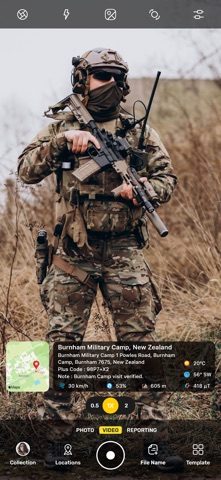

O tej aplikacji
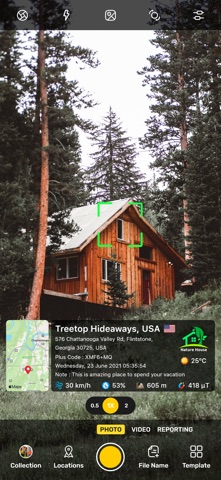
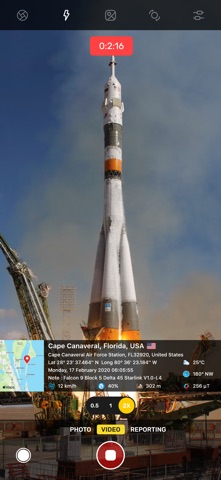
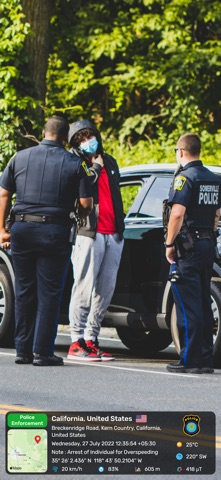
Regardless of whether It's your moment recollections or your visit at a specific destination, with GPS Map camera stamp application, add Date, time, Map, Latitude, Longitude, Altitude, Weather, Magnetic field, Compass to Your Camera Photos.
Track Live location along with your captured photos by GPS Map Camera: Geotag Photos App. Send your Geo Location of Street / Place added photos to your Family & Friends, and let them know about your best earth travel memories and movements.
How to add GPS map location on photos?
- Install GPS Map Camera: Geotag Photos App
- Select Advance or classic Template, Arrange Format of Stamp, Change Settings according to Your requirement of GPS Location Stamp
- Add GPS Location stamp automatically to your clicked pictures
Interesting Features:
- Get GPS camera with Grid, Ratio, Front & Selfie camera, Flash, Focus, Mirror, Timer, capture sound Support
- Set Map data as Automatic
- Classic Template contains automatically fetched stamp details
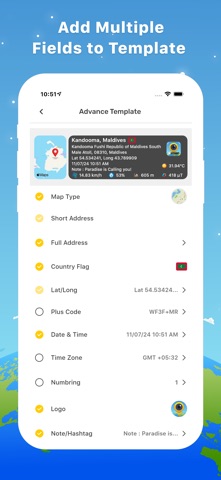
In Advance Template Section:
- Custom maps options: Change Map type from Normal, Satellite, Terrain, Hybrid
- Address: Add your selected Automatic location on the Photo
- Lat/Long: Set GPS Coordinates from DMS or Decimal Options for GPS Stamp
- Date & Time: Add Date & Timestamp from various formats as an image tag
- Logo: upload your own brand logo
- Note: Write relatable Notes
- Hashtags: You can add hashtags related to your photos with this GPS app
- Weather: Either in Fahrenheit or Celsius, Measure Temperature Units
- Compass: Auto compass direction
- Magnetic Field: Auto magnetic field Details
- Wind: Measure Wind speed
- Humidity: Auto Humidity measurement
- Pressure: Measure pressure of the place
- Altitude: It will automatically calculate Altitude
- Accuracy: Get auto accuracy on image
Why to have GPS Map Camera in your Smartphone:
- To Add Satellite Map Stamp on Photos
- To Add GPS Location Stamp on photos
- To Add Geotag Stamp
- To Add Date Timestamp
- To Add Latitude, Longitude, Address
- To Check GPS tracker stamp
- To Get Geo Location image stamp
Most Efficient Application For Following Groups of People:
- Travelers & Explorers – Capture memories with accurate geo-tagging and never forget where each moment happened.
- Real Estate, Infrastructure & Architecture Professionals – Easily document site progress with GPS-stamped images for better tracking and reporting.
- Event Celebrations – Weddings, birthdays, festivals, anniversaries - add a live location stamp to make your special moments even more meaningful.
- Business & Corporate Professionals – Perfect for meetings, conferences and site visits where location proof matters.
- Bloggers & Creators – Travel, food, fashion, or art - enhance your content with location tagging.
- Location-Based Businesses – Instantly share images with live location data to build trust and transparency with clients.
- Anyone who wants to add GPS Details on their photos can use the App.
SUBSCRIPTION:
Upgrade to GPS Map Camera Premium to unlock all features and remove ads.
Available Plans:
• 6-Month Plan
• 1-Year Plan
- Your subscription will automatically renew unless canceled at least 24 hours before the current period ends.
- Your account will be charged for renewal within 24 hours before the end of the current period.
- Payment will be charged to your Apple ID account.
- You can manage or turn off auto-renewal in your Account Settings after purchase.
Privacy Policy: https://sites.google.com/view/gmcapp-privacy/home
Terms of Use: https://sites.google.com/view/gmctermsofservice/home
Do not forget to share your best experiences with us through Rate & Review.
Track Live location along with your captured photos by GPS Map Camera: Geotag Photos App. Send your Geo Location of Street / Place added photos to your Family & Friends, and let them know about your best earth travel memories and movements.
How to add GPS map location on photos?
- Install GPS Map Camera: Geotag Photos App
- Select Advance or classic Template, Arrange Format of Stamp, Change Settings according to Your requirement of GPS Location Stamp
- Add GPS Location stamp automatically to your clicked pictures
Interesting Features:
- Get GPS camera with Grid, Ratio, Front & Selfie camera, Flash, Focus, Mirror, Timer, capture sound Support
- Set Map data as Automatic
- Classic Template contains automatically fetched stamp details
In Advance Template Section:
- Custom maps options: Change Map type from Normal, Satellite, Terrain, Hybrid
- Address: Add your selected Automatic location on the Photo
- Lat/Long: Set GPS Coordinates from DMS or Decimal Options for GPS Stamp
- Date & Time: Add Date & Timestamp from various formats as an image tag
- Logo: upload your own brand logo
- Note: Write relatable Notes
- Hashtags: You can add hashtags related to your photos with this GPS app
- Weather: Either in Fahrenheit or Celsius, Measure Temperature Units
- Compass: Auto compass direction
- Magnetic Field: Auto magnetic field Details
- Wind: Measure Wind speed
- Humidity: Auto Humidity measurement
- Pressure: Measure pressure of the place
- Altitude: It will automatically calculate Altitude
- Accuracy: Get auto accuracy on image
Why to have GPS Map Camera in your Smartphone:
- To Add Satellite Map Stamp on Photos
- To Add GPS Location Stamp on photos
- To Add Geotag Stamp
- To Add Date Timestamp
- To Add Latitude, Longitude, Address
- To Check GPS tracker stamp
- To Get Geo Location image stamp
Most Efficient Application For Following Groups of People:
- Travelers & Explorers – Capture memories with accurate geo-tagging and never forget where each moment happened.
- Real Estate, Infrastructure & Architecture Professionals – Easily document site progress with GPS-stamped images for better tracking and reporting.
- Event Celebrations – Weddings, birthdays, festivals, anniversaries - add a live location stamp to make your special moments even more meaningful.
- Business & Corporate Professionals – Perfect for meetings, conferences and site visits where location proof matters.
- Bloggers & Creators – Travel, food, fashion, or art - enhance your content with location tagging.
- Location-Based Businesses – Instantly share images with live location data to build trust and transparency with clients.
- Anyone who wants to add GPS Details on their photos can use the App.
SUBSCRIPTION:
Upgrade to GPS Map Camera Premium to unlock all features and remove ads.
Available Plans:
• 6-Month Plan
• 1-Year Plan
- Your subscription will automatically renew unless canceled at least 24 hours before the current period ends.
- Your account will be charged for renewal within 24 hours before the end of the current period.
- Payment will be charged to your Apple ID account.
- You can manage or turn off auto-renewal in your Account Settings after purchase.
Privacy Policy: https://sites.google.com/view/gmcapp-privacy/home
Terms of Use: https://sites.google.com/view/gmctermsofservice/home
Do not forget to share your best experiences with us through Rate & Review.
Szczegóły
| Deweloper | SUSAMP INFOTECH |
|---|---|
| Kategoria | Zdjęcia i wideo |
| Cena | Darmowy |
| Ocena wiekowa | 4+ |
| Wersja | 1.8.13 |
| Rozmiar | 93.5 MB |
| Minimalny iOS | 14.0 |
| ID pakietu | com.gpsmapcamera.geotagginglocationonphoto |
| Wydano | 2020-03-30 |
| Ostatnia aktualizacja | 2026-09-22 |
| Języki | 11 języki |
Na co odpowiada ta strona
- GPS Map Camera : Geo Timestamp recenzje aplikacji
- GPS Map Camera : Geo Timestamp ocena aplikacji
- GPS Map Camera : Geo Timestamp pobranie
- GPS Map Camera : Geo Timestamp pozycja w sklepie z aplikacjami
- recenzje GPS Map Camera : Geo Timestamp
- recenzje i oceny GPS Map Camera : Geo Timestamp
- czy GPS Map Camera : Geo Timestamp jest legalny
- czy GPS Map Camera : Geo Timestamp to oszustwo
- prawdziwe recenzje użytkowników GPS Map Camera : Geo Timestamp
- ocena GPS Map Camera : Geo Timestamp
- skargi na GPS Map Camera : Geo Timestamp
- co ludzie mówią o GPS Map Camera : Geo Timestamp
- recenzje GPS Map Camera : Geo Timestamp aplikacja
- zalety i wady GPS Map Camera : Geo Timestamp
- doświadczenie GPS Map Camera : Geo Timestamp
- czy powinienem zaufać GPS Map Camera : Geo Timestamp
- opinie o GPS Map Camera : Geo Timestamp
- recenzja GPS Map Camera : Geo Timestamp 2026
- sprawdzenie GPS Map Camera : Geo Timestamp
- sprawdzenie bezpieczeństwa GPS Map Camera : Geo Timestamp
