
Camera M - Pro Manual Camera
bxb Zdjęcia i wideo 4+ £7.99
4.38 · 81 ocen
Najlepsza pozycja teraz
#31
w 6 sklepach
Szczyt
#9Dni śledzone
55Oceny
81 Historia wykresu
55 dni zarejestrowanych przez nas
Sklepy
wykres w 6 dzisiaj
Oceny
81 w App Store
Cena
zmieniono 15 raz(y) w naszym oknie
Instalacje i przychody
Apple nie publikuje żadnych — nie zgadujemy
Obecnie na wykresie
Historia
Zbudowane na podstawie codziennych zrzutów Astriny — jeden punkt dziennie.
Pozycja na wykresie — 🇬🇧 Najlepsze płatne
24.07 14.08 24.09
Pokaż liczby
| Dzień | Pozycja |
|---|---|
| 24.07 | #50 |
| 02.08 | #39 |
| 09.08 | #47 |
| 10.08 | #22 |
| 11.08 | #52 |
| 12.08 | #23 |
| 13.08 | #18 |
| 14.08 | #23 |
| 25.08 | #17 |
| 26.08 | #27 |
| 27.08 | #29 |
| 07.09 | #30 |
| 11.09 | #28 |
| 12.09 | #30 |
| 23.09 | #54 |
| 24.09 | #31 |
Liczba ocen
31.08 08.09 23.09
Pokaż liczby
| Dzień | Oceny |
|---|---|
| 31.08 | 1,406 |
| 01.09 | 1,408 |
| 03.09 | 1,408 |
| 04.09 | 1,407 |
| 05.09 | 1,407 |
| 06.09 | 1,407 |
| 07.09 | 1,407 |
| 08.09 | 1,407 |
| 09.09 | 1,407 |
| 12.09 | 1,406 |
| 18.09 | 1,409 |
| 19.09 | 1,409 |
| 20.09 | 1,410 |
| 21.09 | 1,410 |
| 22.09 | 1,410 |
| 23.09 | 1,411 |
Zrzuty ekranu




O tej aplikacji
Camera M is a professional manual camera app designed to do one thing exceptionally well – to help you capture beautiful photos in the highest possible quality with powerful and precise manual camera controls akin to a DSLR.
HIGHLIGHTS
• Fluid gesture-based native manual controls with 'Fine-Tuning' feature
• iOS 26 optimization with Liquid Glass design
• Minimum focus distance display for macro photography
• Intelligent Focus Tracking
• Focus Peaking and 4x magnifier loupe with panning function
• Live RGB and RGB luminance histograms
• Manual gray card calibration
• Max Image Processing to ensure the absolute best image quality
• Zero-process RAW support
• ProRAW*, RAW, HEIF, JPEG, TIFF, and PNG image formats
• Single, Burst, Timer, Live, Depth*, Dual Photo*, and Bracket shooting modes
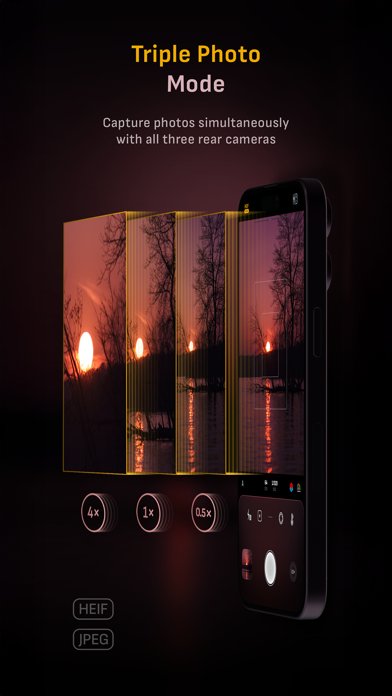
• Triple Photo mode with simultaneous ultra-wide, wide-angle, and telephoto camera capture*
• Darkroom integration
• Great widgets for photography
• App Shortcuts
CAMERA CONTROLS
– Manual focus
– Macro and Scene focus presets
– Exposure bias
– Manual ISO & exposure duration adjustments
– ISO & exposure duration semi-priority modes
– Manual white balance temperature and tint
– White balance presets
– Gray card white balance calibration
– Auto, on, and off flash modes
– Manual torch brightness level
– Manual switching between Ultra Wide, Wide, and Telephoto cameras*
– Digital pinch zoom with 10x range
– Camera Control support for all manual controls
– Lock Screen camera capture support
IMAGE FORMATS
– Apple ProRAW*
– RAW with stabilization*
– HEIF with optional minimum compression*
– JPEG with optional minimum compression
– TIFF
– PNG
– Live Photo*
– P3 wide color support*
SHOOTING MODES
– Single
– Burst
– Timer
– Depth*
– Dual/Triple Photo*
– Live Photo*
– Bracket
TOOLS
– Exposure offset gauge
– Intelligent Focus Tracking
– Live focus peaking assistant
– 4x magnifier loupe with panning function
– Minimum focus distance display
– Live RGB and RGB luminance histograms
– Highlight & shadow alert display
– Horizon level with available pitch tracking and flat options
– Rule of Thirds, Golden Ratio, Quadrant, and Square grids
– Siri Shortcuts and App Shortcuts
– Detailed camera specifications display with PDF export
MAX IMAGE PROCESSING
– Deep Fusion and Smart HDR support for iPhone 11 and later.
– Ensures maximum image quality with better noise reduction, image stabilization, and additional processing for all other iPhones and iPads
ZERO-PROCESS RAW
– Capture standard RAW files with absolutely no processing
PHOTO LIBRARY
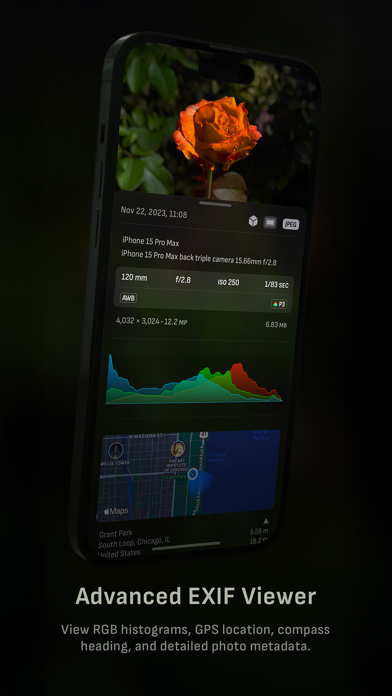
– Summarized and full EXIF metadata display
– Location data display with compass and elevation
– RGB and RGB luminance histogram displays
– Access to all photo albums and folders
WIDGETS
– Home Screen: Golden Hour, EXIF, and Cameras
– Lock Screen: Cameras and Golden Hour
– Control Center: Focus, exposure, and white balance
APPLE WATCH SUPPORT
– Shutter button control
– Sunrise, sunset, and Golden Hour display with sun position indicator
ERGONOMICS
– True one-handed control on all iPhones
– An uncompromising approach to user experience in landscape orientation
ACCESSIBILITY
– Dynamic Type and Bold Text support
– Increase Contrast support
TECHNOLOGY
Camera M is powered exclusively by native APIs and frameworks. There are absolutely no dependencies on any outside sources. This makes Camera M responsive and efficient — from its small download size down to its quick app launch times.
We hope you enjoy taking amazing photos with Camera M!
Website: www.camera-m.com
User manual: www.camera-m.com/manual
Get in touch: [email protected]
Follow us: @CameraMApp
#CameraM
* These features are available on supported devices only.
* Depth capture requires iPhone X, or later.
* Depth capture for selfies requires an iPhone or an iPad with a TrueDepth camera system.
* Apple ProRAW capture requires iPhone 12 Pro or later.
* For more information on device and feature compatibility: www.camera-m.com/compatibility
HIGHLIGHTS
• Fluid gesture-based native manual controls with 'Fine-Tuning' feature
• iOS 26 optimization with Liquid Glass design
• Minimum focus distance display for macro photography
• Intelligent Focus Tracking
• Focus Peaking and 4x magnifier loupe with panning function
• Live RGB and RGB luminance histograms
• Manual gray card calibration
• Max Image Processing to ensure the absolute best image quality
• Zero-process RAW support
• ProRAW*, RAW, HEIF, JPEG, TIFF, and PNG image formats
• Single, Burst, Timer, Live, Depth*, Dual Photo*, and Bracket shooting modes
• Triple Photo mode with simultaneous ultra-wide, wide-angle, and telephoto camera capture*
• Darkroom integration
• Great widgets for photography
• App Shortcuts
CAMERA CONTROLS
– Manual focus
– Macro and Scene focus presets
– Exposure bias
– Manual ISO & exposure duration adjustments
– ISO & exposure duration semi-priority modes
– Manual white balance temperature and tint
– White balance presets
– Gray card white balance calibration
– Auto, on, and off flash modes
– Manual torch brightness level
– Manual switching between Ultra Wide, Wide, and Telephoto cameras*
– Digital pinch zoom with 10x range
– Camera Control support for all manual controls
– Lock Screen camera capture support
IMAGE FORMATS
– Apple ProRAW*
– RAW with stabilization*
– HEIF with optional minimum compression*
– JPEG with optional minimum compression
– TIFF
– PNG
– Live Photo*
– P3 wide color support*
SHOOTING MODES
– Single
– Burst
– Timer
– Depth*
– Dual/Triple Photo*
– Live Photo*
– Bracket
TOOLS
– Exposure offset gauge
– Intelligent Focus Tracking
– Live focus peaking assistant
– 4x magnifier loupe with panning function
– Minimum focus distance display
– Live RGB and RGB luminance histograms
– Highlight & shadow alert display
– Horizon level with available pitch tracking and flat options
– Rule of Thirds, Golden Ratio, Quadrant, and Square grids
– Siri Shortcuts and App Shortcuts
– Detailed camera specifications display with PDF export
MAX IMAGE PROCESSING
– Deep Fusion and Smart HDR support for iPhone 11 and later.
– Ensures maximum image quality with better noise reduction, image stabilization, and additional processing for all other iPhones and iPads
ZERO-PROCESS RAW
– Capture standard RAW files with absolutely no processing
PHOTO LIBRARY
– Summarized and full EXIF metadata display
– Location data display with compass and elevation
– RGB and RGB luminance histogram displays
– Access to all photo albums and folders
WIDGETS
– Home Screen: Golden Hour, EXIF, and Cameras
– Lock Screen: Cameras and Golden Hour
– Control Center: Focus, exposure, and white balance
APPLE WATCH SUPPORT
– Shutter button control
– Sunrise, sunset, and Golden Hour display with sun position indicator
ERGONOMICS
– True one-handed control on all iPhones
– An uncompromising approach to user experience in landscape orientation
ACCESSIBILITY
– Dynamic Type and Bold Text support
– Increase Contrast support
TECHNOLOGY
Camera M is powered exclusively by native APIs and frameworks. There are absolutely no dependencies on any outside sources. This makes Camera M responsive and efficient — from its small download size down to its quick app launch times.
We hope you enjoy taking amazing photos with Camera M!
Website: www.camera-m.com
User manual: www.camera-m.com/manual
Get in touch: [email protected]
Follow us: @CameraMApp
#CameraM
* These features are available on supported devices only.
* Depth capture requires iPhone X, or later.
* Depth capture for selfies requires an iPhone or an iPad with a TrueDepth camera system.
* Apple ProRAW capture requires iPhone 12 Pro or later.
* For more information on device and feature compatibility: www.camera-m.com/compatibility
Szczegóły
| Deweloper | bxb |
|---|---|
| Kategoria | Zdjęcia i wideo |
| Cena | £7.99 |
| Ocena wiekowa | 4+ |
| Wersja | 9.4 |
| Rozmiar | 30.1 MB |
| Minimalny iOS | 16 |
| ID pakietu | com.bxb.camera-m |
| Wydano | 2017-08-03 |
| Ostatnia aktualizacja | 2026-09-23 |
| Języki | 5 języki |
Na co odpowiada ta strona
- Camera M - Pro Manual Camera recenzje aplikacji
- Camera M - Pro Manual Camera ocena aplikacji
- Camera M - Pro Manual Camera pobranie
- Camera M - Pro Manual Camera pozycja w sklepie z aplikacjami
- recenzje Camera M - Pro Manual Camera
- recenzje i oceny Camera M - Pro Manual Camera
- czy Camera M - Pro Manual Camera jest legalny
- czy Camera M - Pro Manual Camera to oszustwo
- prawdziwe recenzje użytkowników Camera M - Pro Manual Camera
- ocena Camera M - Pro Manual Camera
- skargi na Camera M - Pro Manual Camera
- co ludzie mówią o Camera M - Pro Manual Camera
- recenzje Camera M - Pro Manual Camera aplikacja
- zalety i wady Camera M - Pro Manual Camera
- doświadczenie Camera M - Pro Manual Camera
- czy powinienem zaufać Camera M - Pro Manual Camera
- opinie o Camera M - Pro Manual Camera
- recenzja Camera M - Pro Manual Camera 2026
- sprawdzenie Camera M - Pro Manual Camera
- sprawdzenie bezpieczeństwa Camera M - Pro Manual Camera
