
Najlepsza pozycja teraz
#10
w 8 sklepach
Szczyt
#2Dni śledzone
59Oceny
147 Historia wykresu
59 dni zarejestrowanych przez nas
Sklepy
wykres w 8 dzisiaj
Oceny
147 w App Store
Cena
zmieniono 33 raz(y) w naszym oknie
Instalacje i przychody
Apple nie publikuje żadnych — nie zgadujemy
Obecnie na wykresie
Historia
Zbudowane na podstawie codziennych zrzutów Astriny — jeden punkt dziennie.
Pozycja na wykresie — 🇩🇪 Najlepsze płatne
23.07 26.08 24.09
Pokaż liczby
| Dzień | Pozycja |
|---|---|
| 23.07 | #12 |
| 24.07 | #22 |
| 25.07 | #32 |
| 31.07 | #35 |
| 01.08 | #29 |
| 02.08 | #24 |
| 03.08 | #8 |
| 04.08 | #13 |
| 05.08 | #7 |
| 06.08 | #12 |
| 07.08 | #13 |
| 08.08 | #20 |
| 10.08 | #20 |
| 11.08 | #14 |
| 12.08 | #24 |
| 13.08 | #11 |
| 14.08 | #10 |
| 15.08 | #15 |
| 16.08 | #14 |
| 17.08 | #5 |
| 18.08 | #12 |
| 19.08 | #11 |
| 20.08 | #26 |
| 21.08 | #20 |
| 22.08 | #31 |
| 23.08 | #10 |
| 24.08 | #23 |
| 25.08 | #24 |
| 26.08 | #19 |
| 27.08 | #14 |
| 28.08 | #15 |
| 29.08 | #18 |
| 30.08 | #28 |
| 31.08 | #19 |
| 01.09 | #10 |
| 02.09 | #13 |
| 03.09 | #16 |
| 04.09 | #18 |
| 05.09 | #24 |
| 06.09 | #24 |
| 07.09 | #16 |
| 08.09 | #59 |
| 09.09 | #22 |
| 10.09 | #20 |
| 11.09 | #11 |
| 12.09 | #16 |
| 13.09 | #22 |
| 14.09 | #21 |
| 15.09 | #18 |
| 16.09 | #32 |
| 17.09 | #12 |
| 18.09 | #15 |
| 19.09 | #12 |
| 20.09 | #44 |
| 21.09 | #33 |
| 22.09 | #26 |
| 24.09 | #10 |
Liczba ocen
23.07 13.08 30.08
Pokaż liczby
| Dzień | Oceny |
|---|---|
| 23.07 | 148 |
| 24.07 | 148 |
| 25.07 | 148 |
| 31.07 | 148 |
| 01.08 | 148 |
| 02.08 | 148 |
| 03.08 | 148 |
| 04.08 | 148 |
| 05.08 | 148 |
| 06.08 | 148 |
| 07.08 | 148 |
| 08.08 | 148 |
| 09.08 | 148 |
| 10.08 | 148 |
| 11.08 | 148 |
| 12.08 | 148 |
| 13.08 | 148 |
| 14.08 | 148 |
| 15.08 | 148 |
| 16.08 | 148 |
| 17.08 | 148 |
| 18.08 | 148 |
| 19.08 | 148 |
| 20.08 | 148 |
| 21.08 | 148 |
| 22.08 | 148 |
| 23.08 | 148 |
| 24.08 | 148 |
| 25.08 | 148 |
| 26.08 | 148 |
| 27.08 | 148 |
| 28.08 | 148 |
| 29.08 | 148 |
| 30.08 | 148 |
Zrzuty ekranu

O tej aplikacji
Pythonista is a complete scripting environment for Python 3.10, running right on your iPad or iPhone, so you can develop and run Python scripts on the go.
Like Python itself, "batteries are included" – from popular third-party modules like requests, numpy, matplotlib, pandas (and many more) to modules that are tailor-made for iOS. With Pythonista, your scripts can access sensor/location data, your photo library, contacts, reminders, the clipboard, and more, allowing you to harness the full potential of both Python and iOS.
Pythonista is designed with a user-friendly interface that makes it easy for anyone to get started with coding, regardless of skill level. The complete Python documentation is also available for offline reading in the app.
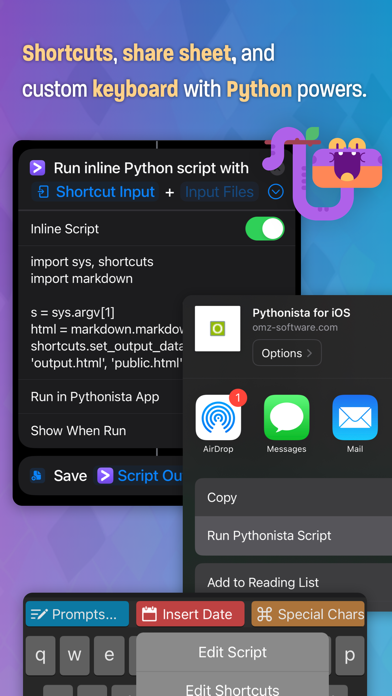
Pythonista is not just for learning and practicing Python – it's also a powerful tool for automating iOS with multiple app extensions. You can invoke scripts directly from the share sheet or a custom system keyboard in almost any app, and integrate scripts with Shortcuts and Siri. With Pythonista, it's easy to run your scripts whenever you need them, without having to switch between different apps.
Features:
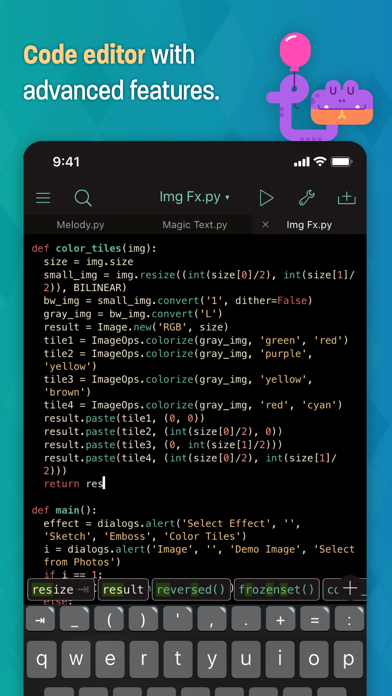
> Powerful code editor with syntax highlighting, code completion, and scripting support
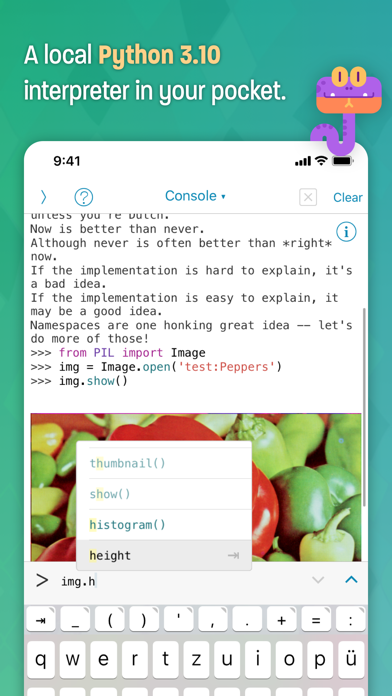
> Interactive prompt with code completion, command history, and support for showing images
> Integrated visual debugger and object inspector
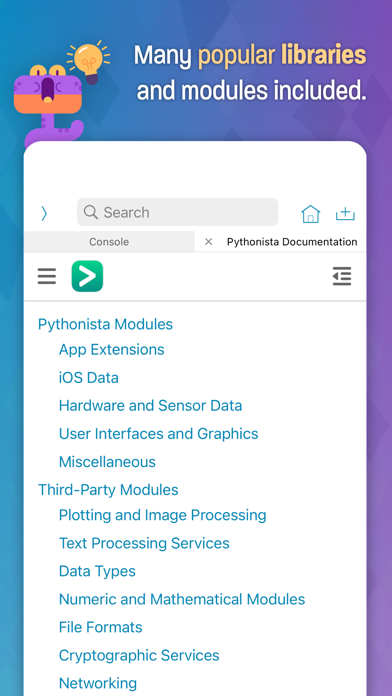
> Complete offline documentation with quick lookup directly from the editor
> Various beautiful light and dark color themes, and a theme editor to make your own
> UI editor for quick prototyping
> Integrated PEP 8 style checker and code formatter
> Supports most of the Python standard library and additional modules for graphics, sound, and iOS integration (for example clipboard, contacts, reminders, photos, ui...)
> Many popular third-party modules included, for example requests, numpy, matplotlib, pandas, Pillow...
> Lots of included examples
> Universal app for iPad and iPhone
> Share sheet extension for running scripts from almost any app
> Scriptable system-wide keyboard to use Python in any app that edits text
> Advanced integration with the Shortcuts app, allowing you to use Python scripts as actions in shortcuts and personal automations.
Please note that Pythonista is not designed to enable the installation or download of additional modules written in compiled languages (C/C++). While many popular native libraries are included and work out-of-the-box, it is generally not possible to install additional modules with C/C++ dependencies.
The name "Pythonista" is used with kind permission from the Python Software Foundation.
Like Python itself, "batteries are included" – from popular third-party modules like requests, numpy, matplotlib, pandas (and many more) to modules that are tailor-made for iOS. With Pythonista, your scripts can access sensor/location data, your photo library, contacts, reminders, the clipboard, and more, allowing you to harness the full potential of both Python and iOS.
Pythonista is designed with a user-friendly interface that makes it easy for anyone to get started with coding, regardless of skill level. The complete Python documentation is also available for offline reading in the app.
Pythonista is not just for learning and practicing Python – it's also a powerful tool for automating iOS with multiple app extensions. You can invoke scripts directly from the share sheet or a custom system keyboard in almost any app, and integrate scripts with Shortcuts and Siri. With Pythonista, it's easy to run your scripts whenever you need them, without having to switch between different apps.
Features:
> Powerful code editor with syntax highlighting, code completion, and scripting support
> Interactive prompt with code completion, command history, and support for showing images
> Integrated visual debugger and object inspector
> Complete offline documentation with quick lookup directly from the editor
> Various beautiful light and dark color themes, and a theme editor to make your own
> UI editor for quick prototyping
> Integrated PEP 8 style checker and code formatter
> Supports most of the Python standard library and additional modules for graphics, sound, and iOS integration (for example clipboard, contacts, reminders, photos, ui...)
> Many popular third-party modules included, for example requests, numpy, matplotlib, pandas, Pillow...
> Lots of included examples
> Universal app for iPad and iPhone
> Share sheet extension for running scripts from almost any app
> Scriptable system-wide keyboard to use Python in any app that edits text
> Advanced integration with the Shortcuts app, allowing you to use Python scripts as actions in shortcuts and personal automations.
Please note that Pythonista is not designed to enable the installation or download of additional modules written in compiled languages (C/C++). While many popular native libraries are included and work out-of-the-box, it is generally not possible to install additional modules with C/C++ dependencies.
The name "Pythonista" is used with kind permission from the Python Software Foundation.
Szczegóły
| Deweloper | omz:software |
|---|---|
| Kategoria | Produktywność |
| Cena | 9,99 € |
| Ocena wiekowa | 4+ |
| Wersja | 3.4 |
| Rozmiar | 853 MB |
| Minimalny iOS | 12.0 |
| ID pakietu | com.omz-software.Pythonista3 |
| Wydano | 2016-06-14 |
| Ostatnia aktualizacja | 2023-04-27 |
| Języki | 1 języki |
Na co odpowiada ta strona
- Pythonista 3 recenzje aplikacji
- Pythonista 3 ocena aplikacji
- Pythonista 3 pobranie
- Pythonista 3 pozycja w sklepie z aplikacjami
- recenzje Pythonista 3
- recenzje i oceny Pythonista 3
- czy Pythonista 3 jest legalny
- czy Pythonista 3 to oszustwo
- prawdziwe recenzje użytkowników Pythonista 3
- ocena Pythonista 3
- skargi na Pythonista 3
- co ludzie mówią o Pythonista 3
- recenzje Pythonista 3 aplikacja
- zalety i wady Pythonista 3
- doświadczenie Pythonista 3
- czy powinienem zaufać Pythonista 3
- opinie o Pythonista 3
- recenzja Pythonista 3 2026
- sprawdzenie Pythonista 3
- sprawdzenie bezpieczeństwa Pythonista 3
