
Mapvia: Auto Timestamp GPS Cam
nguyen hiep Foto e Video 4+ Gratuito
4.31 · 563 valutazioni
Migliore posizione ora
#58
attraverso 1 negozi
Picco
#52Giorni monitorati
4Valutazioni
563 Cronologia grafico
4 giorni registrati da noi
Negozi
grafico in 1 oggi
Valutazioni
563 sull'App Store
Prezzo
cambiato 3 volta(e) nella nostra finestra
Installazioni e ricavi
Apple non pubblica nulla — non facciamo supposizioni
Attualmente in classifica
Storia
Costruito dalle istantanee quotidiane di Astrina — un punto al giorno.
Posizione in classifica — 🇺🇸 Top Gratis
20.09 21.09 23.09
Mostra i numeri
| Giorno | Posizione |
|---|---|
| 20.09 | #56 |
| 21.09 | #56 |
| 22.09 | #52 |
| 23.09 | #58 |
Numero di valutazioni
20.09 21.09 23.09
Mostra i numeri
| Giorno | Valutazioni |
|---|---|
| 20.09 | 555 |
| 21.09 | 556 |
| 22.09 | 558 |
| 23.09 | 563 |
Screenshot



Informazioni su quest'app
Mapvia helps users capture photos and videos with location details and turn them into visual memories. The app combines GPS camera tools, map based tagging, earth view discovery, and a personal library so every moment can be saved with context and style.
▶ Features That Bring Memories to Life
• Shoot With GPS Details
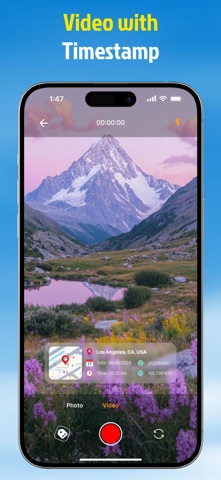
Take photos and videos with real time location information shown on the screen. Add place name, date, time, and coordinates to make each memory more meaningful.
• See Your Memories on the Map
View your memories on a map and revisit places you have been. Browse saved locations through a visual map experience and explore your personal footprint over time.
• Explore Earth in Multiple Views
Discover the world from a global perspective. Explore places in 2D, 3D, satellite, terrain, and night map styles for a richer location experience.
• Import Photos and Add Places
Import existing photos from your device and add location tags afterward. This makes it easy to organize old memories even if they were not captured in the app.
• Customize Your Location Tags
Create your own location tag with flexible settings. Choose map view, date and time type, date and time format, background color, and text color to match your style.
• Choose Current or Manual Location
Use your current location instantly or add a location manually. This gives you more control when you want to attach a place to a photo or video.
• Keep Photos and Videos in One Library
Manage all saved content in one library. Switch between photo and video collections, review past memories, and quickly create new ones.
▶ Why Use Mapvia:
Mapvia is designed for people who want more than a basic camera. It helps preserve where and when a moment happened, making every photo or video easier to remember, organize, and share.
▶ Perfect for Travel, Family, and Daily Life
• Travel memories
• Daily moments
• Location based storytelling
• Personal memory collection
• Creative photo tagging
Mapvia - Memory Map is built for people who want to keep more than just an image. It helps preserve the full story behind every moment by combining visuals, location, time, and map based context in one simple experience. Whether you are documenting daily life, travel memories, or meaningful places, Memory Map turns ordinary captures into memories you can revisit with greater clarity and emotion.
Terms of Use: https://www.apple.com/legal/internet-services/itunes/dev/stdeula/
▶ Features That Bring Memories to Life
• Shoot With GPS Details
Take photos and videos with real time location information shown on the screen. Add place name, date, time, and coordinates to make each memory more meaningful.
• See Your Memories on the Map
View your memories on a map and revisit places you have been. Browse saved locations through a visual map experience and explore your personal footprint over time.
• Explore Earth in Multiple Views
Discover the world from a global perspective. Explore places in 2D, 3D, satellite, terrain, and night map styles for a richer location experience.
• Import Photos and Add Places
Import existing photos from your device and add location tags afterward. This makes it easy to organize old memories even if they were not captured in the app.
• Customize Your Location Tags
Create your own location tag with flexible settings. Choose map view, date and time type, date and time format, background color, and text color to match your style.
• Choose Current or Manual Location
Use your current location instantly or add a location manually. This gives you more control when you want to attach a place to a photo or video.
• Keep Photos and Videos in One Library
Manage all saved content in one library. Switch between photo and video collections, review past memories, and quickly create new ones.
▶ Why Use Mapvia:
Mapvia is designed for people who want more than a basic camera. It helps preserve where and when a moment happened, making every photo or video easier to remember, organize, and share.
▶ Perfect for Travel, Family, and Daily Life
• Travel memories
• Daily moments
• Location based storytelling
• Personal memory collection
• Creative photo tagging
Mapvia - Memory Map is built for people who want to keep more than just an image. It helps preserve the full story behind every moment by combining visuals, location, time, and map based context in one simple experience. Whether you are documenting daily life, travel memories, or meaningful places, Memory Map turns ordinary captures into memories you can revisit with greater clarity and emotion.
Terms of Use: https://www.apple.com/legal/internet-services/itunes/dev/stdeula/
Dettagli
| Sviluppatore | nguyen hiep |
|---|---|
| Categoria | Foto e Video |
| Prezzo | Gratuito |
| Valutazione per età | 4+ |
| Versione | 1.2.7 |
| Dimensione | 196 MB |
| iOS minimo | 16.0 |
| ID pacchetto | com.app.gpscamera.location |
| Rilasciato | 2025-04-28 |
| Ultimo aggiornamento | 2026-09-11 |
| Lingue | 1 lingue |
Cosa risponde questa pagina
- Mapvia: Auto Timestamp GPS Cam recensioni dell'app
- Mapvia: Auto Timestamp GPS Cam valutazione dell'app
- Mapvia: Auto Timestamp GPS Cam download
- Mapvia: Auto Timestamp GPS Cam posizione nell'app store
- recensioni di Mapvia: Auto Timestamp GPS Cam
- recensioni e valutazioni di Mapvia: Auto Timestamp GPS Cam
- è Mapvia: Auto Timestamp GPS Cam legittimo
- è Mapvia: Auto Timestamp GPS Cam una truffa
- recensioni di utenti reali di Mapvia: Auto Timestamp GPS Cam
- valutazione di Mapvia: Auto Timestamp GPS Cam
- reclami di Mapvia: Auto Timestamp GPS Cam
- cosa dicono le persone su Mapvia: Auto Timestamp GPS Cam
- recensioni di Mapvia: Auto Timestamp GPS Cam app
- pro e contro di Mapvia: Auto Timestamp GPS Cam
- esperienza di Mapvia: Auto Timestamp GPS Cam
- dovrei fidarmi di Mapvia: Auto Timestamp GPS Cam
- feedback di Mapvia: Auto Timestamp GPS Cam
- recensione di Mapvia: Auto Timestamp GPS Cam 2026
- controllo di Mapvia: Auto Timestamp GPS Cam
- controllo di sicurezza di Mapvia: Auto Timestamp GPS Cam
