
Best position now
#20
across 2 storefronts
Peak
#20Days tracked
1 Chart history
1 days recorded by us
Storefronts
charting in 2 today
Ratings
none yet
Price
unchanged in our window
Installs and revenue
Apple publishes none — we do not guess
Currently charting
History starts today. Come back tomorrow to see how its chart position and ratings move — the daily job records one point per day.
Screenshots



About this app
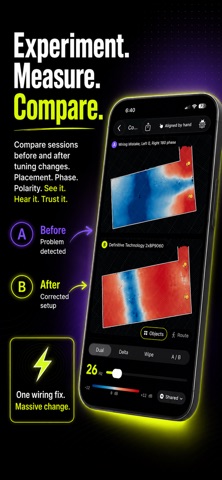
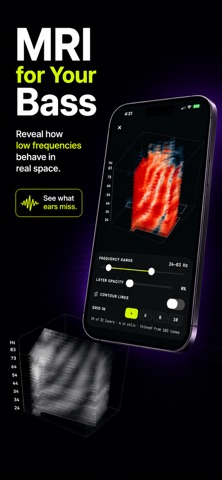
BassMap turns your home theater into an acoustic masterpiece. Walk around with your iPhone and build a spatial heatmap that reveals bass peaks, nulls, standing waves, and dead zones.
Move your subwoofer. Change your listening position. Adjust EQ or crossover settings. Measure again and compare.
Use BassMap to optimize your setup, dial in subwoofer placement, find ideal listening spots, and see exactly how acoustic panels, bass traps, or room layout changes impact your audio performance.
**With BassMap you can:**
* Locate acoustic dead zones so you know exactly where low end disappears
* Find the ideal sub placement through real-time trial and comparison
* Dial in your primary listening seat for the flattest frequency response
* Verify acoustic treatment to see if your bass traps are actually working
* Inspect specific problem frequencies to target annoying room resonances
* Track setup iterations with side-by-side visual measurement overlays
* Optimize receiver settings by testing different EQ and crossover points
Perfect for home theaters, stereo systems, audiophiles, and anyone who wants better bass without guessing.
Designed for stereo setups, multi-channel surround, audiophiles, and anyone seeking balanced bass response.
**Scan your space. Test your placement. Hear the difference.**
Move your subwoofer. Change your listening position. Adjust EQ or crossover settings. Measure again and compare.
Use BassMap to optimize your setup, dial in subwoofer placement, find ideal listening spots, and see exactly how acoustic panels, bass traps, or room layout changes impact your audio performance.
**With BassMap you can:**
* Locate acoustic dead zones so you know exactly where low end disappears
* Find the ideal sub placement through real-time trial and comparison
* Dial in your primary listening seat for the flattest frequency response
* Verify acoustic treatment to see if your bass traps are actually working
* Inspect specific problem frequencies to target annoying room resonances
* Track setup iterations with side-by-side visual measurement overlays
* Optimize receiver settings by testing different EQ and crossover points
Perfect for home theaters, stereo systems, audiophiles, and anyone who wants better bass without guessing.
Designed for stereo setups, multi-channel surround, audiophiles, and anyone seeking balanced bass response.
**Scan your space. Test your placement. Hear the difference.**
Details
| Developer | ExpoWizard |
|---|---|
| Category | Entertainment |
| Price | £4.99 |
| Age rating | 4+ |
| Version | 1.0.1 |
| Size | 6.6 MB |
| Minimum iOS | 17.0 |
| Bundle ID | com.expowizard.bassmap.app |
| Released | 2026-09-08 |
| Last updated | 2026-09-18 |
| Languages | 1 languages |
What this page answers
- BassMap: Acoustic Visualizer app reviews
- BassMap: Acoustic Visualizer app rating
- BassMap: Acoustic Visualizer download
- BassMap: Acoustic Visualizer app store rank
- BassMap: Acoustic Visualizer reviews
- BassMap: Acoustic Visualizer reviews and ratings
- is BassMap: Acoustic Visualizer legit
- is BassMap: Acoustic Visualizer a scam
- BassMap: Acoustic Visualizer real user reviews
- BassMap: Acoustic Visualizer rating
- BassMap: Acoustic Visualizer complaints
- what people say about BassMap: Acoustic Visualizer
- BassMap: Acoustic Visualizer pros and cons
- BassMap: Acoustic Visualizer experience
- should I trust BassMap: Acoustic Visualizer
- BassMap: Acoustic Visualizer feedback
- BassMap: Acoustic Visualizer review 2026
- BassMap: Acoustic Visualizer check
- BassMap: Acoustic Visualizer safety check
- reviews about BassMap: Acoustic Visualizer
